Interactive TUI
ColdReach includes a full-screen interactive terminal app built with Textual.
No coldreach serve needed — the TUI calls Python APIs directly and works offline.
Layout
┌─ Header ──────────────────────────────────────────────────────────────────┐
│  ⚡ Find  ✓ Verify  ● Status  ⊟ Cache        q:quit  ?:help              │
├───────────────────────────────────────────────────────────────────────────┤
│                                                                           │
│  (screen content)                                                         │
│                                                                           │
├─ Footer (keybindings) ─────────────────────────────────────────────────────┤
│  f Find  v Verify  s Status  c Cache  q Quit  ? Help                     │
└───────────────────────────────────────────────────────────────────────────┘
Find tab (f)
The primary screen. Type a domain and watch emails stream in as each source completes.
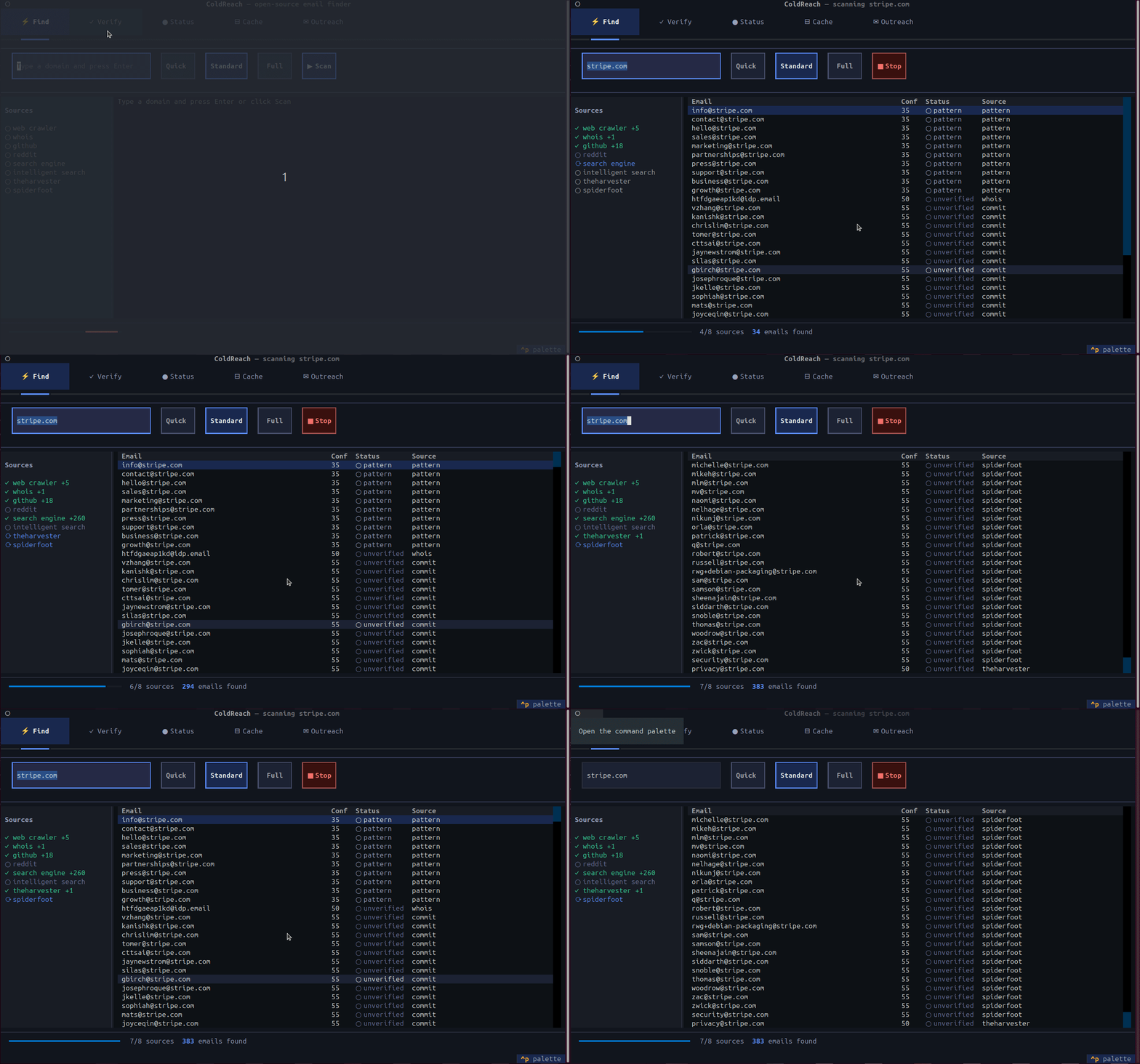
Domain: stripe.com_          [Quick]  [Standard]  [Full]  [▶ Scan]  [■ Stop]
┌─ Sources ────────────────┬─ Results ────────────────────────────────────┐
│  ✓ web_crawler    +3     │  Email                      Conf   Status    │
│  ✓ whois          +1     │  ─────────────────────────────────────────── │
│  ✓ github         +24    │  legal@stripe.com            91    ● likely  │
│  ✓ searxng        +2     │  press@stripe.com            87    ● likely  │
│  ⟳ spiderfoot  …        │  info@stripe.com             55    ○ unverif │
│  ○ theharvester          │  contact@stripe.com          35    ○ pattern │
│                          │                                               │
│  ████████░░  80%  30 found                                              │
└──────────────────────────┴───────────────────────────────────────────────┘
Source pill states:
| Icon | Colour | Meaning |
|---|---|---|
○ |
dim | Waiting to run |
⟳ |
blue | Running |
✓ +N |
green | Done — found N emails |
○ |
dim | Done — found 0 |
✗ |
red | Error |
Scan modes — active mode is highlighted with blue border:
| Mode | Time | Sources |
|---|---|---|
| Quick | ~30s | Web, WHOIS, GitHub, SearXNG, Reddit |
| Standard | ~3 min | All of the above + SpiderFoot, theHarvester, IntelligentSearch |
| Full | ~8 min | Everything including Firecrawl |
Result status column:
| Status | Colour | Meaning |
|---|---|---|
● likely |
blue | High confidence (≥70), found in strong source |
○ unverified |
dim | Found but not SMTP-verified — use Verify tab |
○ pattern |
grey | Generated role/pattern address (info@, sales@, etc.) |
● valid |
green | Verified via Reacher SMTP |
○ catch_all |
yellow | Domain accepts all addresses |
✗ invalid |
red | SMTP rejected |
Keyboard shortcuts (Find tab):
| Key | Action |
|---|---|
Enter |
Start scan |
↑ / ↓ |
Navigate results |
y |
Copy selected email to clipboard |
d |
Open Groq draft panel for selected email |
e |
Export results as CSV to ~/domain-emails.csv |
r |
Re-scan current domain |
Groq Draft Panel
Press d on any result row to open an inline draft panel:
┌─ ✏️  Draft for legal@stripe.com ───────────────────────────────────────┐
│  Your name:  Jane Smith                                                │
│  What you want:  explore a partnership on embedded payments            │
│  Type:  [🤖 Auto]  [🤝 Partner]  [💼 Job]  [💰 Sales]                │
│                              [✨ Generate draft]                       │
│                                                                        │
│  Subject                                                               │
│  Quick question about Stripe's embedded payments                       │
│                                                                        │
│  Body                                                                  │
│  Hi Patrick, I came across Stripe's recent expansion…                  │
│                                                                        │
│  Best, Jane Smith                                                      │
│                                   [📋 Copy full email]  [↺ Regenerate]│
└────────────────────────────────────────────────────────────────────────┘
Your name is remembered across sessions. Press Esc to close without generating.
Requires Groq API key
Add COLDREACH_GROQ_API_KEY=gsk_xxx to .env.
Free key at console.groq.com.
Verify tab (v)
Single-email pipeline check with animated steps.

Email: patrick@stripe.com_                              [▶ Verify]

  patrick@stripe.com                                    Score: 85

  ✓  Syntax         Valid RFC 5322 format
  ✓  Disposable     Not a throwaway domain
  ✓  DNS / MX       5 MX records (aspmx.l.google.com +4)
  ✓  SMTP (Reacher) Deliverable — not catch-all
  ○  Holehe         press h to run

  [h] Holehe check    [f] Find domain    [y] Copy email
Shortcuts:
| Key | Action |
|---|---|
Enter |
Run verification |
h |
Run Holehe platform check (slow, ~30s) |
f |
Jump to Find tab with this email's domain |
y |
Copy email to clipboard |
Status tab (s)
Live service health. Auto-refreshes every 30 seconds.

┌──────────────┐  ┌──────────────┐  ┌──────────────┐  ┌──────────────┐
│ SearXNG      │  │ Reacher      │  │ SpiderFoot   │  │ theHarvester │
│ ● ONLINE     │  │ ● ONLINE     │  │ ● ONLINE     │  │ ● ONLINE     │
│ :8088  84ms  │  │ :8083  55ms  │  │ :5001  49ms  │  │ :5050  35ms  │
│ Metasearch   │  │ SMTP verify  │  │ OSINT 200+   │  │ Multi-source │
└──────────────┘  └──────────────┘  └──────────────┘  └──────────────┘

Optional packages
✓ dspy-ai   3.2.0
○ holehe    not installed   pip install coldreach[full]
○ crawl4ai  not installed   pip install crawl4ai && crawl4ai-setup
Press r to force-refresh.
Cache tab (c)
Browse all cached domain scans.
12 domains cached  ·  87 emails  ·  ~/.coldreach/cache.db

Domain              Cached At         Status
stripe.com          2026-05-03 10:21  ● fresh
fareleaders.com     2026-05-02 18:45  ● fresh
snapdeal.com        2026-05-01 09:12  ⚠ expiring
aurven.com          2026-04-28 14:33  ✗ expired
Shortcuts:
| Key | Action |
|---|---|
↑ / ↓ |
Navigate |
f |
Open selected domain in Find tab (re-scan) |
x |
Delete selected entry |
X |
Clear all (prompts confirmation) |
r |
Refresh list |
Outreach tab (o)
Track every contact you have drafted, sent, or heard back from.

3 contacts  ·  1 replied  ·  1 sent  ·  1 draft

Email                    Domain          Status      Subject                  Sent At
─────────────────────────────────────────────────────────────────────────────────────
patrick@stripe.com       stripe.com      ✓ replied   Partnership on Stripe…   May 2
legal@kayak.com          kayak.com       → sent      Quick question about …   May 3
press@airbnb.com         airbnb.com      ● draft     Exploring a collabora…   —
Contacts are added automatically when you press d on an email in the Find tab and generate a draft.
Shortcuts:
| Key | Action |
|---|---|
d |
Open draft panel for selected contact |
s |
Mark as sent |
R |
Mark as replied |
x |
Remove from list |
y |
Copy saved draft to clipboard |
f |
Jump to Find tab for that domain |
r |
Refresh |
Status icons:
| Icon | Color | Meaning |
|---|---|---|
○ |
dim | Added, not yet drafted |
● |
blue | Draft generated |
→ |
yellow | Marked as sent |
✓ |
green | Replied |
Help overlay (?)
Press ? anywhere to see all keyboard shortcuts.
Headless CLI mode
All existing CLI commands still work with --cli:
coldreach --cli find --domain stripe.com --quick
coldreach --cli verify john@stripe.com
coldreach --cli status
Or call them directly (subcommand implies headless):